
Connecting an AI Voice Agent to Your Number
Point an Australian phone number at an AI voice agent. Click2Call has built-in profiles for the major platforms — ElevenLabs, OpenAI, xAI, Retell, VAPI and others — and anything else that speaks SIP connects by registration. This guide covers both, plus the three settings that catch most people out.
Last reviewed: October 2026
Connecting Your Agent, Step by Step
Check whether your provider is built in
Open Voice → Profiles and open the Connection Type list. Click2Call ships ready-made profiles for the major AI voice platforms:
If your provider is on that list, select it and Click2Call fills in the SIP route for you. A few profiles ask for one identifier — an OpenAI Project ID, a VAPI Assistant ID, a Twilio or LiveKit subdomain — and the rest need nothing at all. Each name above links to a step-by-step guide covering both ends of the connection.
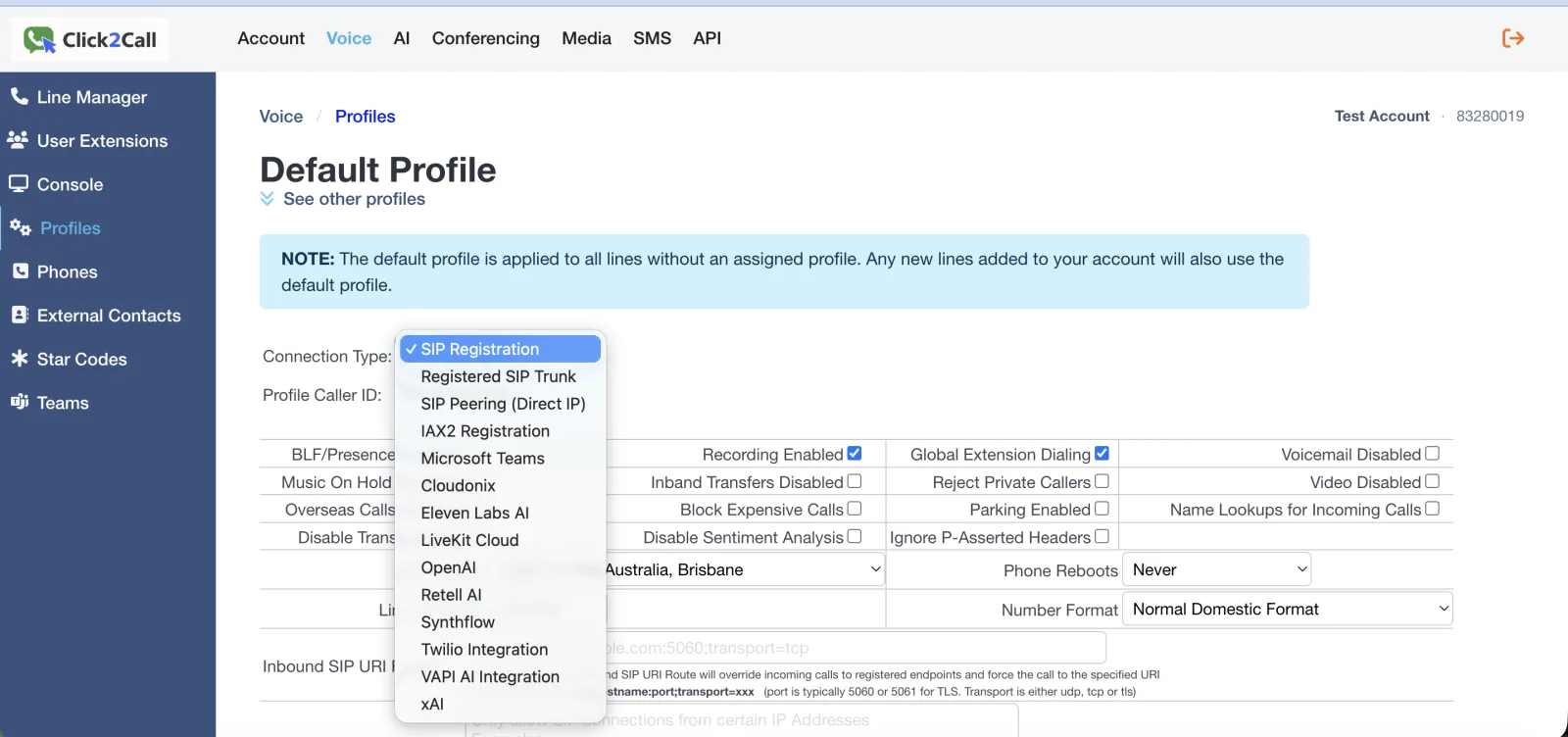
Not on the list? That is fine — anything that speaks SIP still connects using the generic method in the next step.
For any other provider, use SIP Registration
Set Connection Type to SIP Registration. Your AI platform then registers to Click2Call the way a softphone or desk phone does, using the phone number as its username.
This is the step people most often get wrong. It is tempting to pick SIP Peering (Direct IP) because you are joining two platforms — but peering means the two ends trust each other by IP address, with no credentials at all. If you have a username and password, you want registration.
Get the credentials for the line
Open Voice → Line Manager. Each number has a Password column with a View control that reveals the SIP password for that line. The username is the number itself, in full international format.
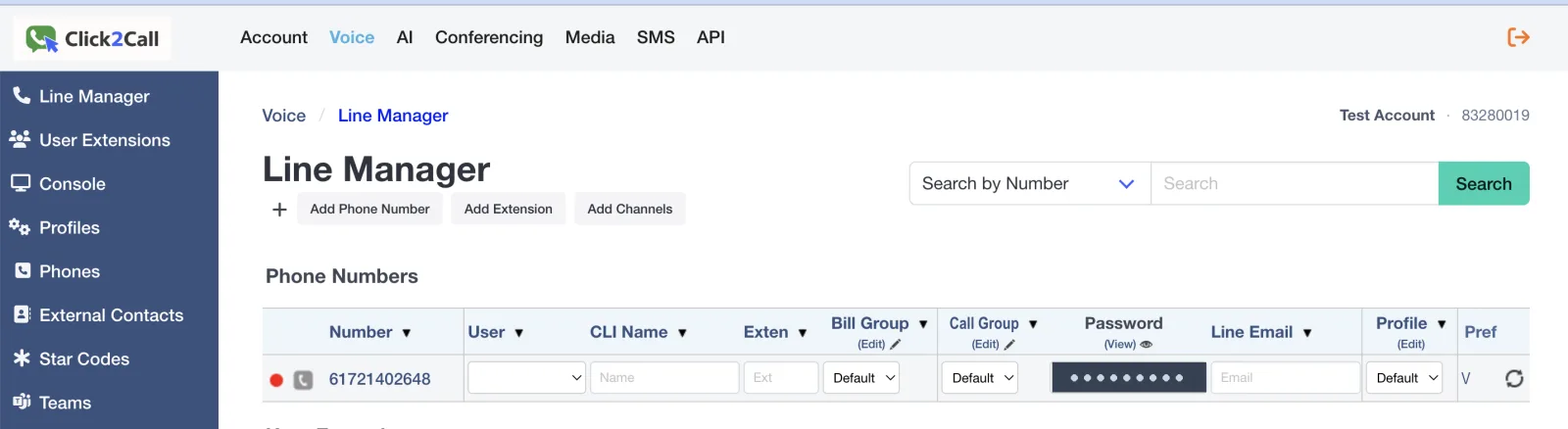
Treat the line password as a credential. Anyone holding it can register a device as that number and place calls billed to your account.
Enter the details on the AI platform
In the platform’s SIP or trunk settings, choose registration-based authentication — some platforms label this “username and password” as opposed to “IP” — then enter the values below.
SIP Credentials Reference
Enter these values exactly as shown into your phone's SIP account settings.
| Username / Login / User ID | Your Click2Call phone number including country code e.g. 61234567890 |
| Authorisation Name / Display Name | Your Click2Call phone number including country code e.g. 61234567890 |
| Password | Your Click2Call password (set in the Password box on the number’s row in Voice → Line Manager) |
| Host / Proxy / Domain | sip.click2call.com.au |
| Outbound Proxy | sip.click2call.com.au |
| SIP Transport | UDP, TCP, or TLS — TLS preferred |
| SIP Port | 5060 or 50600 (UDP/TCP) • 5061 (TLS) |
| DTMF Mode | RFC 2833 (also listed as AVT or Out-of-Band) |
| STUN Server | Not required |
Check the number is on the right profile
Back in Line Manager, confirm the Profile column for that number points at the profile you configured.
This one catches almost everybody. The default profile applies to every line with no profile assigned, and new numbers land on it automatically — so a number left on Default quietly ignores the profile you just spent your morning setting up.
Set the time zone on the profile
While you are in the profile, check the Time Zone. Every time-based behaviour on the account reads it — business hours, after-hours routing and call queue schedules all follow this setting.
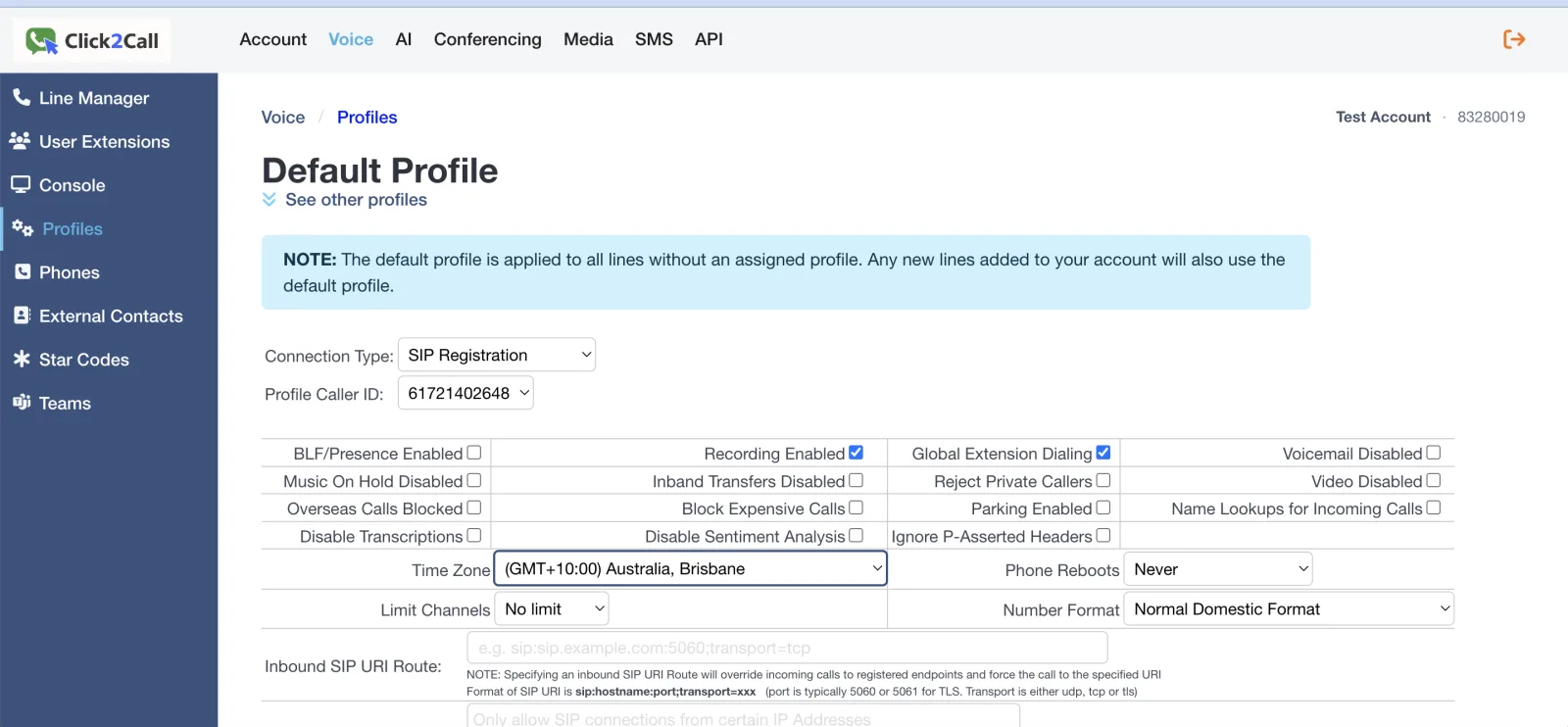
If the phones open and close at the wrong local time, this is almost always why.
Test it
Ring the number from a mobile. Your agent should answer within a couple of seconds.
If the call reaches Click2Call voicemail instead, work through the troubleshooting below.
The address to allowlist
When Click2Call delivers a call to an external SIP endpoint — any of the built-in provider profiles, or your own Inbound SIP URI Route — the INVITE leaves our switch from:
103.212.52.19
That is the address to put on the provider’s IP allowlist, ACL or access control list. Click2Call cannot present a username and password on an outbound INVITE, so allowlisting is the only way a provider can trust us — if they challenge the call for credentials, it fails.
Some providers only accept individual addresses rather than CIDR ranges. This is a single address, so that is not a problem. Do not allowlist the address that sip.click2call.com.au resolves to — that is the inbound proxy, used when a device registers to us, and it is not where outbound INVITEs come from.
Guides for Each Built-In Provider
The Click2Call side is much the same for all of them. What differs is what the provider needs at their end — and whether you need to write any code at all.
| Provider | Click2Call field | At the provider end |
|---|---|---|
| Eleven Labs AI | no extra fields | No code |
| OpenAI | OpenAI Project ID | Needs a webhook |
| xAI | no extra fields | Needs a webhook |
| Retell AI | no extra fields | No code |
| VAPI AI Integration | VAPI Assistant ID | No code |
| Synthflow | no extra fields | No code |
| LiveKit Cloud | Subdomain and Region | Needs an agent worker |
| Cloudonix | no extra fields | Needs a voice application |
| Twilio Integration | Twilio Subdomain | TwiML or Studio Flow |
Troubleshooting
407 Proxy Authentication Required, over and over
Work out which way the 407 is travelling, because the two causes are opposites.
The AI platform is being challenged as it registers to Click2Call. The profile is set to SIP Peering (Direct IP) when it should be SIP Registration. Peering carries no username or password — the two ends trust each other by IP. If you have credentials, switch to SIP Registration and let the platform register in.
The provider is challenging our outbound INVITE. Their end is asking us to authenticate, which means our signalling address is not on their allowlist. Click2Call cannot present a username and password on an outbound INVITE, so this is never fixed with credentials — have the provider allowlist 103.212.52.19, the address our switch sends INVITEs from. Callers hear “the number you have called is not available from this service” while this is happening.
Calls land on Click2Call voicemail instead of the agent
Check three things, in this order. Is the platform actually registered? Is the number assigned to your profile rather than Default? And is an Inbound SIP URI Route set on the profile? A URI route overrides delivery to registered endpoints and forces the call to that URI — so never set one on a profile that uses registration.
Registration fails, or the platform reports the endpoint unreachable
Make sure the transport matches the port. Port 5061 is TLS only; a platform set to UDP while pointing at 5061 will never connect. Use TLS on 5061, or UDP/TCP on 5060. All three transports are supported — we recommend TLS, but the right choice is whichever the platform at the other end handles well.
TLS connects but the platform rejects the certificate
Some SIP clients verify the TLS certificate hostname strictly and drop the connection before authenticating, reporting a certificate or hostname mismatch. Two ways forward. If the platform lets you relax hostname verification, do that and stay on TLS. If it does not, fall back to TCP on port 5060 — Click2Call accepts UDP, TCP or TLS, so the connection will work, you just lose the encryption on the signalling. Either way it is worth telling support, because we would rather sort out TLS for you than leave you on TCP.
After-hours or queue schedules trigger at the wrong time
The profile Time Zone is set to the wrong region. Business hours, after-hours routing and queue schedules all read it. Correct the time zone on the profile and the schedules follow.
Everything looks right and the agent still does not answer
Confirm Call Forward Always is off on the line, and that no other call flow feature is configured on that number. A queue, ring group or auto-attendant on the same line takes the call before your agent does.
Frequently Asked Questions
Which AI voice platforms are supported?
Ready-made profiles exist for Eleven Labs AI, OpenAI, xAI, Retell AI, VAPI, Synthflow, LiveKit Cloud, Cloudonix and Twilio. Anything else that speaks SIP connects using generic SIP Registration.
What happens if my AI platform doesn’t answer?
With a built-in profile (Eleven Labs AI, OpenAI, Retell AI and the others), Click2Call sends the call straight to the platform. If the platform doesn’t answer, the call is not failed over to voicemail or another number. If continuity matters, connect the platform with SIP Registration instead.
What address does my AI provider need to allowlist?
103.212.52.19. That is where outbound INVITEs leave our switch when a call is delivered to an external SIP endpoint. It is not the same as the address sip.click2call.com.au resolves to, which is the inbound proxy used for registration.
What username and password does the platform use?
Username and authorisation name are both the phone number in full international format. The password is the line password from Line Manager. Host and outbound proxy are sip.click2call.com.au.
Does the call still get recorded and transcribed?
Yes — provided Recording Enabled is ticked on the profile, calls answered by an AI agent are recorded, transcribed, summarised and sentiment-scored like any other. Those transcripts are how most customers improve what their agent says. See AI voice tools.
Can I use my existing business number?
Yes. Port it across first — see number porting — then point it at your agent. Or test on a new number and move the main one once you are happy.
If the AI platform does not answer
Set an overflow so a call the AI does not pick up still reaches someone. Send the department or group the AI answers for to voicemail, or to another number, when it is not answered. See voicemail, hunt groups and forwarding on no answer.
Related Guides
Still need help?
Email our Australian support team with your account number and what you’re seeing. We support the Click2Call side of this connection; questions about the other product go to its vendor.