

Make Real Phone Calls
From Microsoft Teams in Australia
Your team already uses Microsoft Teams for chat and meetings. Click2Call adds one missing piece — the ability to call any phone number in Australia and receive calls on your business number, all from inside Teams. No new apps, no new hardware, no Microsoft Domestic Calling Plan required.
Key Takeaways
- What it is: Click2Call Microsoft Teams Calling uses Direct Routing to connect Microsoft Teams to the Australian public telephone network via a full Cloud PBX. Every Teams user gets an Australian phone number, 300 outbound minutes, unlimited inbound calls, call recording, AI transcription, AI call summaries, sentiment analysis, voicemail-to-email, auto-attendant, and call queues — all included at $25/user/month (ex GST), paid to Click2Call.
- What Microsoft charges separately: Each user also needs a Microsoft Teams Phone Standard licence (previously called Phone System) — about $15.00/user/month ex GST on Microsoft’s Australian price list — bought directly from Microsoft. Click2Call does not sell Microsoft licences.
- No lock-in: Click2Call operates on a prepaid credit model. There is no minimum contract, no minimum monthly spend, and no cancellation fee.
- Data residency: All call recordings, transcripts, AI outputs, and account data are stored on infrastructure located in Australia and New Zealand. Click2Call does not use offshore servers.
- Number porting: Existing Australian landline, 1300, and 1800 numbers can be ported to Click2Call and used with Microsoft Teams. The porting process typically takes 5–10 business days.
Microsoft Teams Calling for Australian Businesses
Teams is great — but it can't call phones yet. Click2Call's Direct Routing adds the missing piece.
Microsoft Teams is great for chatting with your team, sharing files, and jumping on a video call. But out of the box it can’t do one thing — call a regular phone number. You can’t ring a customer’s mobile, call a supplier, or receive a call from someone dialling your business number.
Click2Call fixes that. We connect your Teams account to the real phone network so your team can call and receive calls from any number in Australia — directly inside the Teams app they already use every day. Nothing changes for them except a dial pad appears.
How It Works
Three things connect together. That’s it.
1. Your Teams App
Your team keeps using Teams exactly as they do now. A dial pad appears and they can make and receive calls like a normal phone.
2. Click2Call Connects Them
We link your Teams account to our Australian phone network. This is the bridge that lets Teams talk to real phone numbers.
3. Any Phone Number in Australia
Once connected, your team can call any landline or mobile in Australia — and customers can call your business number and reach them in Teams.
This approach — called Direct Routing — is Microsoft-approved. It replaces a Microsoft Calling Plan — which in Australia has only been available through Telstra, and is now closed to new customers — with a local provider like Click2Call.
More Than a Phone Number — A Full Cloud PBX Inside Teams
Most Teams calling providers give you a SIP trunk and a number. Click2Call gives you a full Cloud PBX — with Microsoft Teams as the interface. That means every Teams user gets the complete Click2Call feature set included at no extra cost.
-
AI Call Transcription
Every call is automatically transcribed. Search, review, and share transcripts from the portal.
-
AI Call Summaries
After each call, an AI-generated summary captures the key points — no manual note-taking required.
-
Sentiment Analysis
Understand caller tone across every conversation. Flag calls that need follow-up attention.
-
Call Recording
Automatic call recording stored securely in your Click2Call portal. Accessible anytime.
-
Cloud PBX Voicemail
Voicemail delivered to your email inbox with a transcript. Never miss a message.
-
Auto-Attendant / IVR
Greet callers professionally and route them to the right person or team automatically.
-
Call Queues
Queue inbound calls and distribute them across your team. No caller left hanging.
-
Australian & NZ Data Residency
All recordings, transcripts, and call data stored on infrastructure in Australia and New Zealand.
-
Teams Dial Pad
Call any Australian landline or mobile directly from the Teams app — desktop or mobile.
-
Inbound Calls to Teams
Your Australian business number rings directly inside Teams. No separate app needed.
-
Teams Chat & Meetings
Internal messaging and video meetings work exactly as they do today — nothing changes.
-
Mobile & Desktop App
Make and receive calls on any device — Windows, Mac, iOS, or Android.
-
No New Hardware Required
Works on the computers and phones your team already uses. No desk phones needed.
Note: Teams features require a Microsoft 365 business plan with the Teams Phone Standard licence add-on (about $15.00/user/month ex GST, bought directly from Microsoft). Click2Call does not charge for this.
All Click2Call Cloud PBX features are included with every Teams User plan at $25/user/month. No add-ons required for core features. Learn more about AI Voice Tools.
Does Call Recording and AI Transcription Work Inside Microsoft Teams?
Yes, on every call, without any Microsoft recording licence. Every call made or received in Teams through Click2Call passes through the Click2Call Cloud PBX, and that is where recording, transcription, the AI summary and the sentiment score happen — not inside Microsoft 365.
Nothing is installed in your tenant and no Microsoft compliance-recording add-on is involved. After each call the recording and transcript are emailed to the user and stored, searchable, in the Click2Call portal on infrastructure in Australia and New Zealand. Managers see the same call activity, reporting and queue dashboards as any other Cloud PBX user. See what the AI voice tools capture →
What Does Microsoft Teams Calling Actually Cost?
There are three things you need to make calls from Teams. Two are paid to Microsoft, one is paid to Click2Call. Here is exactly what each one does and what it costs.
Before you start: You need a Microsoft 365 Business plan that includes Microsoft Teams (for example, Microsoft 365 Business Basic, Standard, or Premium). A personal Microsoft 365 subscription will not work — Teams calling requires a business plan. If your team already uses Teams for chat and meetings, you almost certainly have this already.
Microsoft Teams Phone Standard Licence
This is the licence that unlocks the dial pad inside Teams. Without it, Teams has no phone functionality at all — you can chat and video call your colleagues, but you cannot call a real phone number. It does not include an Australian number or local calling — that is what Click2Call provides.
Included in Microsoft 365 E5, or available as an add-on to any Microsoft 365 Business plan. Paid directly to Microsoft.
Microsoft Teams User
This gives you an Australian phone number and connects it to Teams via Direct Routing. It includes 300 minutes of outbound calling and unlimited inbound calling. Microsoft does not offer local Australian numbers or affordable local calling in Australia — Click2Call provides both.
Paid to Click2Call. Includes your Australian number, 300 outbound minutes, and unlimited inbound calls.
| Cost Component (per user/month) | Paid to | Amount |
|---|---|---|
| Microsoft 365 Business Plan (must include Teams — Business Basic, Standard, or Premium) | Microsoft | Varies by plan |
| Microsoft Teams Phone Standard Licence (required to enable the dial pad in Teams) | Microsoft | about $15.00/month (ex GST) |
| Microsoft Teams User (Australian number + 300 outbound mins + unlimited inbound) | Click2Call | $25/month (ex GST) |
| Estimated Fixed Monthly Cost (per user, excl. M365 plan) | From about $40/month (ex GST) |
Microsoft Teams Phone Standard is Microsoft’s Australian list price, ex GST on an annual commitment, checked September 2026; monthly billing costs more and prices are set by Microsoft — confirm at microsoft.com. The licence is bought from Microsoft; Click2Call does not charge for it. Click2Call charges $25/month per user for the Microsoft Teams User plan, which includes an Australian number, 300 outbound minutes and unlimited inbound calls. Microsoft’s own Calling Plans are offered only in specific markets; in Australia they have been delivered through Telstra Calling for Office 365, which closed to new customers on 1 November 2024 and is withdrawn from 30 November 2026.
No contracts. No lock-in. Cancel anytime.
Click2Call operates on a prepaid credit model — there is no minimum monthly spend, no lock-in contract, and no cancellation fee. Add credit when you need it and cancel at any time.
Your data stays in Australia and New Zealand.
All call recordings, transcripts, AI-generated outputs, and account data are stored on infrastructure located in Australia and New Zealand. Click2Call does not use offshore servers. Full details are in our Terms and Conditions.
Direct Routing, Operator Connect or a Microsoft Calling Plan: Which Is Right for an Australian Business?
There are three ways to put real phone calls into Microsoft Teams. All three use the same Teams dial pad; they differ in who carries the calls, what you pay and what you get beyond carriage. Click2Call connects via Direct Routing.
| Direct Routing (Click2Call) | Operator Connect | Microsoft Calling Plan | |
|---|---|---|---|
| Who carries the calls | Click2Call, an Australian Cloud PBX, behind your Teams tenant | A Microsoft-certified carrier (in Australia: Telstra, Optus, Symbio, Vocus) | Microsoft, in specific markets — in Australia via Telstra Calling for Office 365 |
| Available to new Australian customers | Yes | Yes | Telstra Calling for Office 365 closed to new customers 1 November 2024 and is withdrawn from 30 November 2026; check microsoft.com for current market availability |
| Microsoft licence needed | Teams Phone Standard | Teams Phone Standard | Teams Phone Standard plus the Calling Plan |
| Australian numbers | Local 02/03/07/08, 1300 and 1800; existing numbers ported | Carrier numbers managed in the Teams admin centre | Telstra-supplied numbers |
| Phone-system features beyond Teams | Full Cloud PBX: IVR, call queues, ring groups, voicemail to email, call recording, AI transcription and summaries, sentiment | Whatever the carrier bundles — usually carriage only | Carriage only |
| Pricing | Flat $25/user/month ex GST in AUD, no lock-in | Set by the carrier | Set by Telstra/Microsoft |
| Setup | Portal-generated PowerShell, about 30 minutes, or managed setup | Carrier onboarding inside the Teams admin centre | — |
Choose Direct Routing with Click2Call if
you want Australian numbers, a real phone system underneath Teams (queues, IVR, recording, AI transcription), flat AUD pricing with no contract, and Australian support — using the Teams Phone Standard licences you already have.
Operator Connect may suit you better if
you want the carrier managed entirely inside the Teams admin centre, already have a contract with one of the certified carriers, and do not need phone-system features beyond what Teams itself provides.
On Telstra Calling for Office 365? It is withdrawn from 30 November 2026. Direct Routing with Click2Call keeps the same Teams dial pad and ports your existing numbers across. Full Direct Routing vs Calling Plan comparison →
Ready to add calling to Microsoft Teams?
Start your free 7-day trial — no credit card required. Set it up yourself in 30 minutes, or let us handle everything for a one-time $50/user fee.
Set It Up Yourself, or Let Us Do It
The setup involves three simple steps and takes about 30 minutes if you have Microsoft Teams Admin access. Prefer to hand it over? We'll handle everything for a one-time fee.
Read the full step-by-step guide with screenshots →
Add Your Teams Number
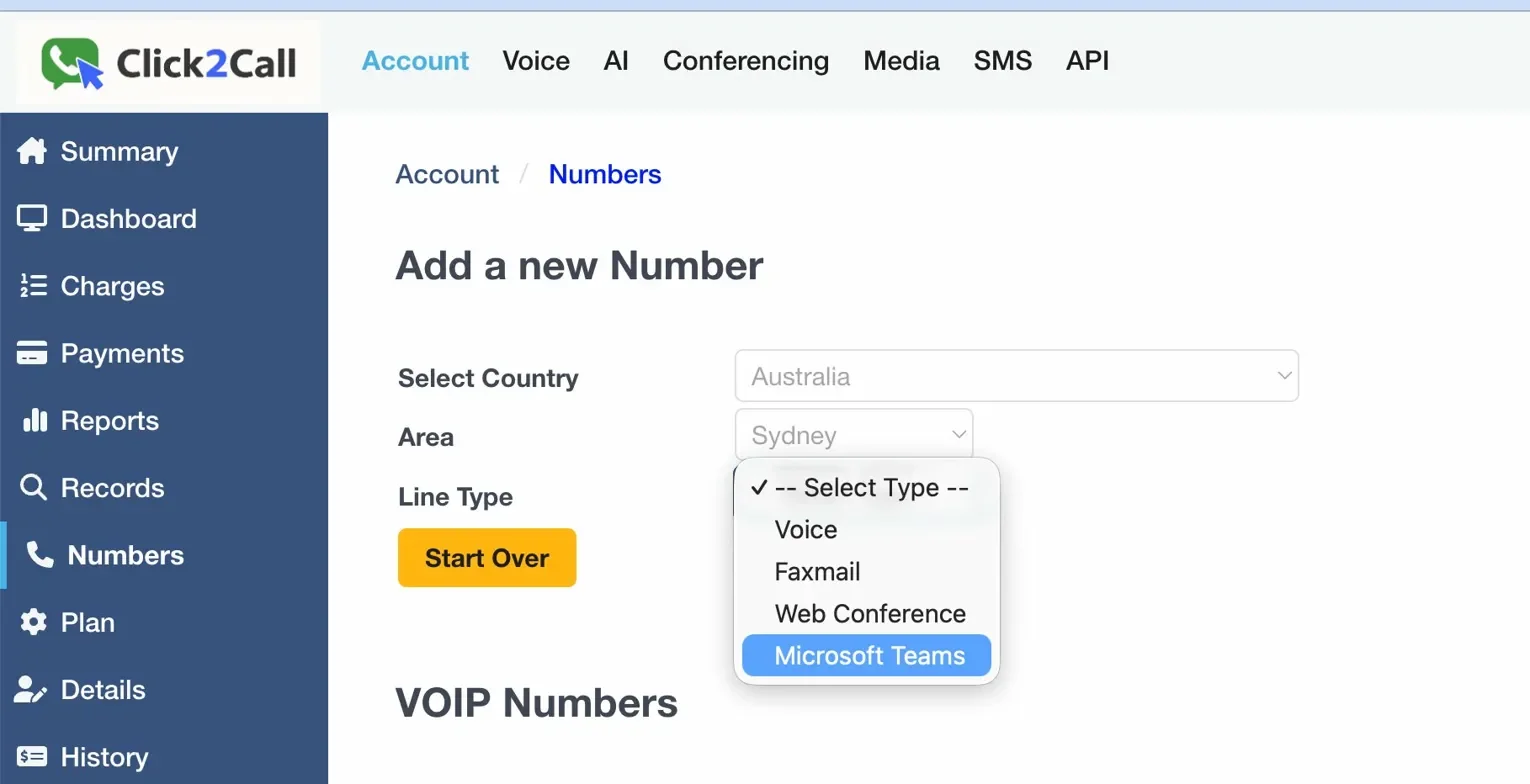
In the Click2Call portal go to Account → Numbers, add a new number and select “Microsoft Teams” as the line type. One number is needed per Teams user.
Assign Your Team Members
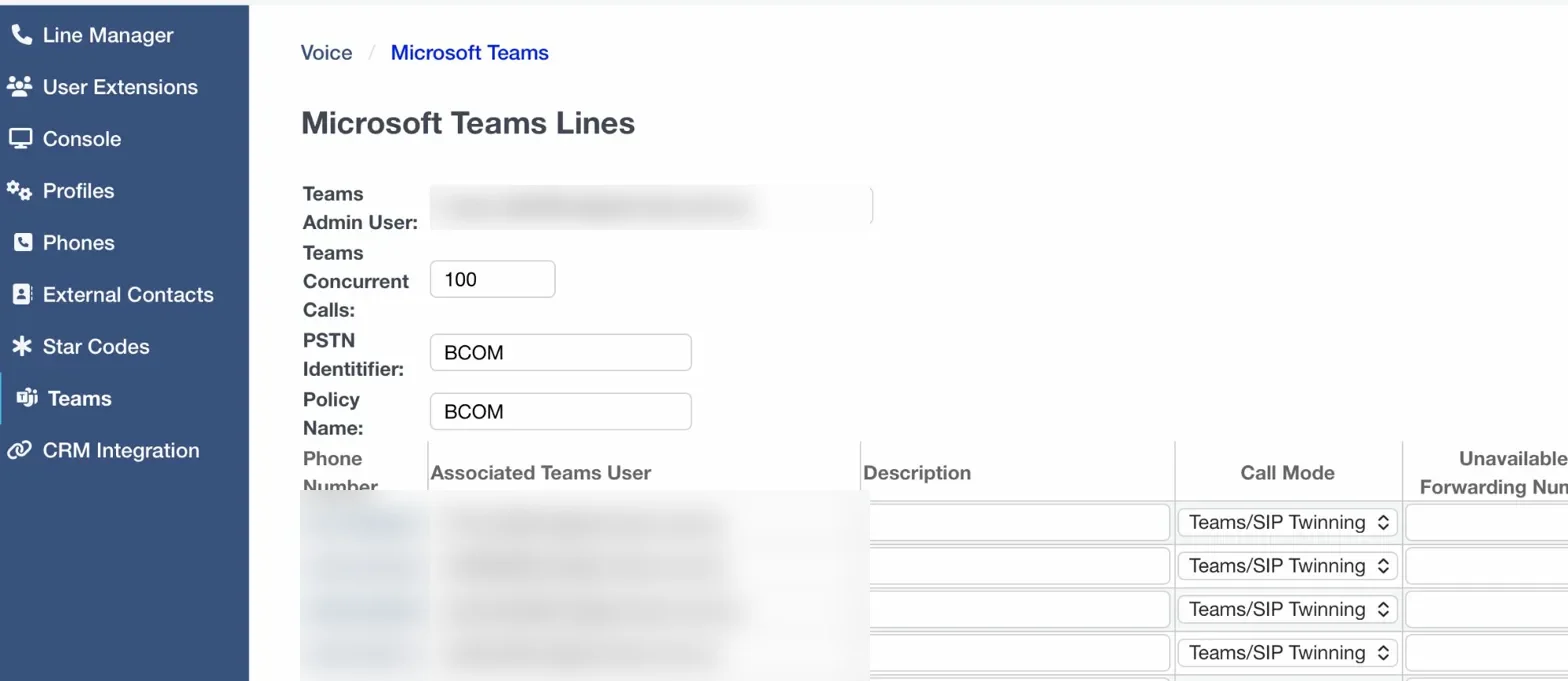
In Voice → Teams, enter each person’s Microsoft 365 email address next to their phone number. The portal generates the PowerShell commands for you automatically.
Run the Script and You’re Done
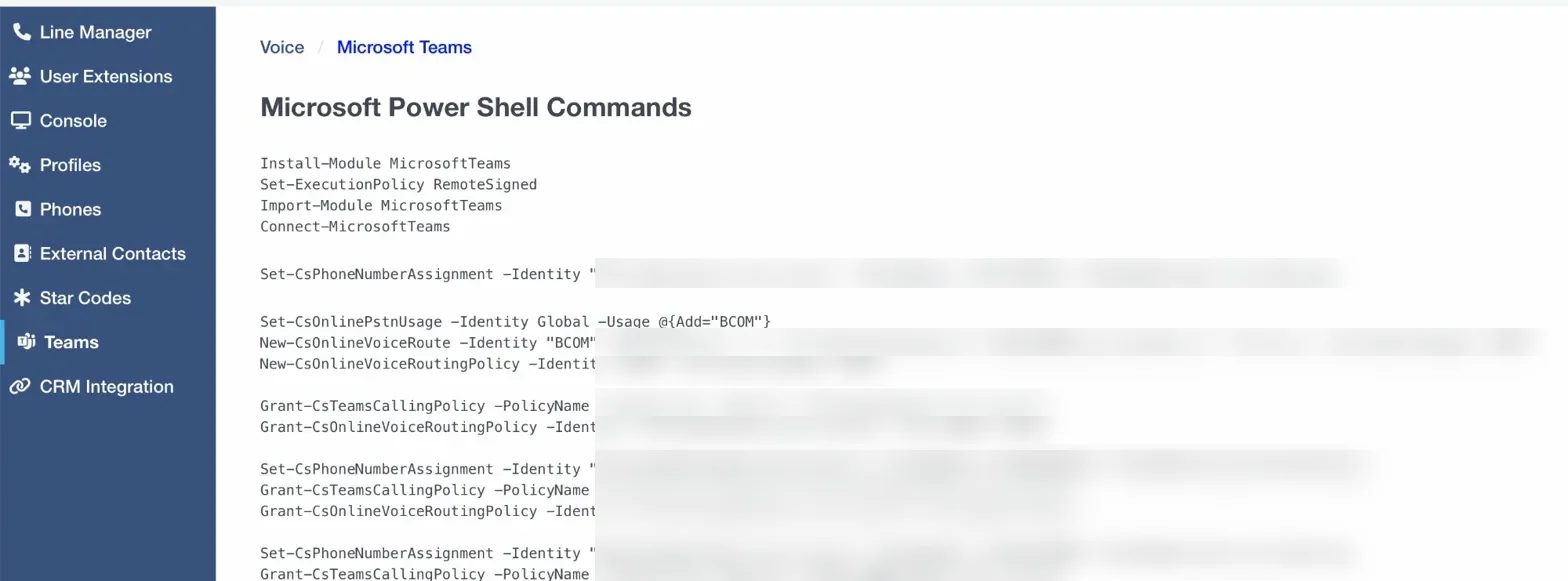
Copy and run the generated PowerShell commands in Microsoft Teams Admin. The dial pad appears in Teams within a few minutes.
Which setup option suits you?
Do It Yourself
- Add a Teams number in the portal (Account → Numbers)
- Assign each person’s Teams email address in Voice → Teams
- Copy and run the PowerShell commands the portal generates for you automatically
- Takes about 30 minutes if you have Teams Admin access
Free no setup fee
Managed Setup
- You provide your team’s Microsoft 365 email addresses
- We configure everything in the portal and run the Microsoft setup commands
- Up and running within 1–2 business days
- Includes testing to confirm every user can call and receive
$50 per user (ex GST) — one-time fee
Both options use the same Click2Call portal and Australian phone network. The managed setup is a one-time fee — no ongoing managed service charges.
Is Microsoft Teams Calling Available in Perth, Sydney, Melbourne and Brisbane?
Yes — Click2Call provides Microsoft Teams calling Australia-wide. When you add a Teams number in the portal you choose the area, so a Perth office gets a local 08 number, a Sydney office an 02 and a Melbourne office an 03, all on one account and one call flow. Regional numbers and 1300/1800 numbers work the same way, and existing numbers port across for a flat $100 including GST.
Somewhere else? See every area we cover →
Common Questions
Direct Routing is the way Click2Call connects your Microsoft Teams to real phone numbers. It’s a Microsoft-approved method that lets your team call any landline or mobile in Australia — and receive calls on your business number — all from inside Teams.
Yes. Each Teams user needs a Microsoft Teams Phone Standard licence (previously called Phone System) — included in Microsoft 365 E5, or added to any Microsoft 365 business plan that includes Teams — bought from Microsoft. Click2Call provides the number, the Direct Routing connection and the Cloud PBX features; it does not sell Microsoft licences. Not sure which licence you have? Ask us and we will check.
A Microsoft Calling Plan bundles the carrier service into your Microsoft bill. Microsoft offers its own Calling Plans only in specific markets; in Australia they have come through Telstra Calling for Office 365, which closed to new customers on 1 November 2024 and is withdrawn from 30 November 2026. Direct Routing puts an Australian provider behind Teams instead: Click2Call supplies local, 1300 and 1800 numbers, flat $25/user/month ex GST pricing in AUD, call recording and AI transcription, and Australian support. Compare Direct Routing and Calling Plans side by side →
Yes. Click2Call supports full number porting, so you can transfer your existing Australian landline or 1300 numbers to our platform and use them with Microsoft Teams. The porting process typically takes 5–10 business days and is managed by our team.
No additional hardware is required. Your team can make and receive calls directly from the Microsoft Teams desktop app, mobile app, or a Teams-certified desk phone. If you prefer physical handsets, we can supply compatible Teams-certified IP phones.
Yes. Click2Call's Microsoft Teams Direct Routing service is available to any Australian business with a stable internet connection, regardless of location. We provide Australian local numbers for all major cities and regions, as well as 1300 and 1800 numbers.
If you set it up yourself using our portal, it usually takes about 30 minutes once you have your number. If you choose our managed setup service ($50 per user, one-time), we handle everything and have you running within 1–2 business days.
Microsoft Teams requires approximately 100 kbps per concurrent call. A standard NBN connection is more than sufficient for most businesses. We recommend a connection with low jitter and latency for the best call quality. Our team can advise on network requirements during the setup process.
Yes, with one caveat. The 7-day free trial gives you a Click2Call account with $11 credit and 10 test calls, no credit card required, so you can test numbers, call flows, recording and transcription. The Microsoft Teams User plan itself is not covered by the trial credit and is purchased separately, and Microsoft licences come from Microsoft. Most businesses run the trial first, then add Teams users when they are ready.
Your numbers live on Click2Call, not inside Microsoft 365, so a Teams outage does not take them down. In the portal (Voice → Microsoft Teams) every Teams line has an Unavailable Forwarding Number for when Teams is offline and a Failover Forwarding Number as a backup — typically a mobile — so calls keep landing. You can also pair a desk phone or softphone with the line using Teams/SIP Twinning.
Click2Call Microsoft Teams Calling connects your Microsoft Teams tenant to the Australian phone network through Direct Routing, with a full Click2Call Cloud PBX underneath. Each Teams user gets an Australian number, 300 outbound minutes, unlimited inbound calls, call recording, AI transcription and summaries, voicemail to email, IVR and call queues for $25 per user per month ex GST, using the Teams dial pad they already have.
Yes. Each Teams line has a Call Mode in the portal. Teams Only rings the Teams app alone and suits most users. Teams/SIP Twinning rings Teams and a paired SIP device — a desk phone or the Click2Call softphone — at the same time, so someone with a handset on the desk and Teams on the laptop can answer on either.
Three things, in order: the user has a Teams Phone Standard licence assigned; the two per-user PowerShell commands (Grant-CsTeamsCallingPolicy and Grant-CsOnlineVoiceRoutingPolicy) ran without error; and the user has signed out of Teams and back in. Policy changes can take up to 10 minutes to reach the Teams client. If outbound calls then fail with an immediate busy tone, re-run the two Grant- commands and check the SBC hostname in the voice route matches your Click2Call Teams domain exactly. Full troubleshooting in the setup guide →
Yes. Telstra Calling for Office 365 is withdrawn from 30 November 2026. Moving to Click2Call Direct Routing keeps your Teams Phone Standard licences and the same Teams dial pad; Click2Call ports your existing numbers for a flat $100 including GST per number (typically 5–10 business days) and adds call recording, AI transcription and the Cloud PBX features. Self-setup takes about 30 minutes, or managed setup is $50 per user. Start well before the withdrawal date so the port completes in time.
Have more questions? View all FAQs for answers to common questions about our services.
Add Calling to Teams Today
Sign up free, add a Teams number in the portal, and have your team making calls in Teams by end of day.
Get Started