
Call Centre Software for Australian Businesses
Call queues, a live call dashboard, intelligent routing, recording, transcription and sentiment analysis — included with every plan, not sold as a contact centre upgrade.
$25 per user per month ex GST. No separate licence, no per-agent surcharge, no lock-in contract.
What You Get
Five capabilities that normally sit behind a more expensive plan.
Call queues
Callers wait in an orderly queue hearing your music and your message, with position and hold-time announcements, instead of an engaged tone.
Live call dashboard
See every call in progress, everyone waiting in a queue and who is available — updating live, with a full-screen view for a wall monitor.
Intelligent routing
Ring groups, business-hours rules, overflow between teams and after-hours handling, all configured in the portal.
Recording & transcription
Every call recorded automatically, transcribed by AI and summarised in plain English, stored in Australia and New Zealand.
Sentiment analysis
Each conversation scored for how the caller sounded, so you can spot frustration patterns without listening to hours of audio.
Included, not extra
All of the above comes with a standard Cloud PBX user. There is no contact centre tier to upgrade to.
Call Queues
A queue holds callers while your team is busy, instead of letting the phone ring out or handing back an engaged tone. It is switched on per phone line, so your main number can queue while a direct line does not.
Who rings, and in what order
You add your team to the queue as a numbered list of agents and choose how they are tried. Ring All rings everyone simultaneously, so whoever is free first picks up — the usual choice for a small team. You set how long each agent's phone rings before the queue moves on, how long to wait before trying someone again, and a wrap-up period so nobody gets a new call the instant they finish the last one.
You can also decide whether the queue should ring someone who is already on a call, and whether staff can see waiting calls on their handset's busy-lamp keys and pick them up directly.
What the caller hears
Callers hear your own music on hold and your own queue announcement, both uploaded in the portal. You choose how often they are told their position in the queue, whether that announcement includes an estimated hold time, and how often a short "thank you for holding" message plays in between. Any of it can be switched off.
Limits and what happens at the end
Set a maximum number of callers allowed to wait, or leave it unlimited. Set a maximum wait time, then decide what happens when it is reached — voicemail, an overflow to another team, or a different number entirely. A queue identifier can be shown in the caller ID so staff know a call arrived from the queue rather than direct.
Queues run on a time schedule, so the same number can queue during trading hours and route somewhere else outside them.
A practical note. A queue is not always the right answer. If callers routinely wait more than a couple of minutes, a queue only makes the wait more orderly — it does not fix being understaffed on the phones. Pairing a queue with the AI Receptionist works better for most businesses, because the AI can answer the straightforward questions outright and only queue the callers who genuinely need a person.
The Live Call Dashboard
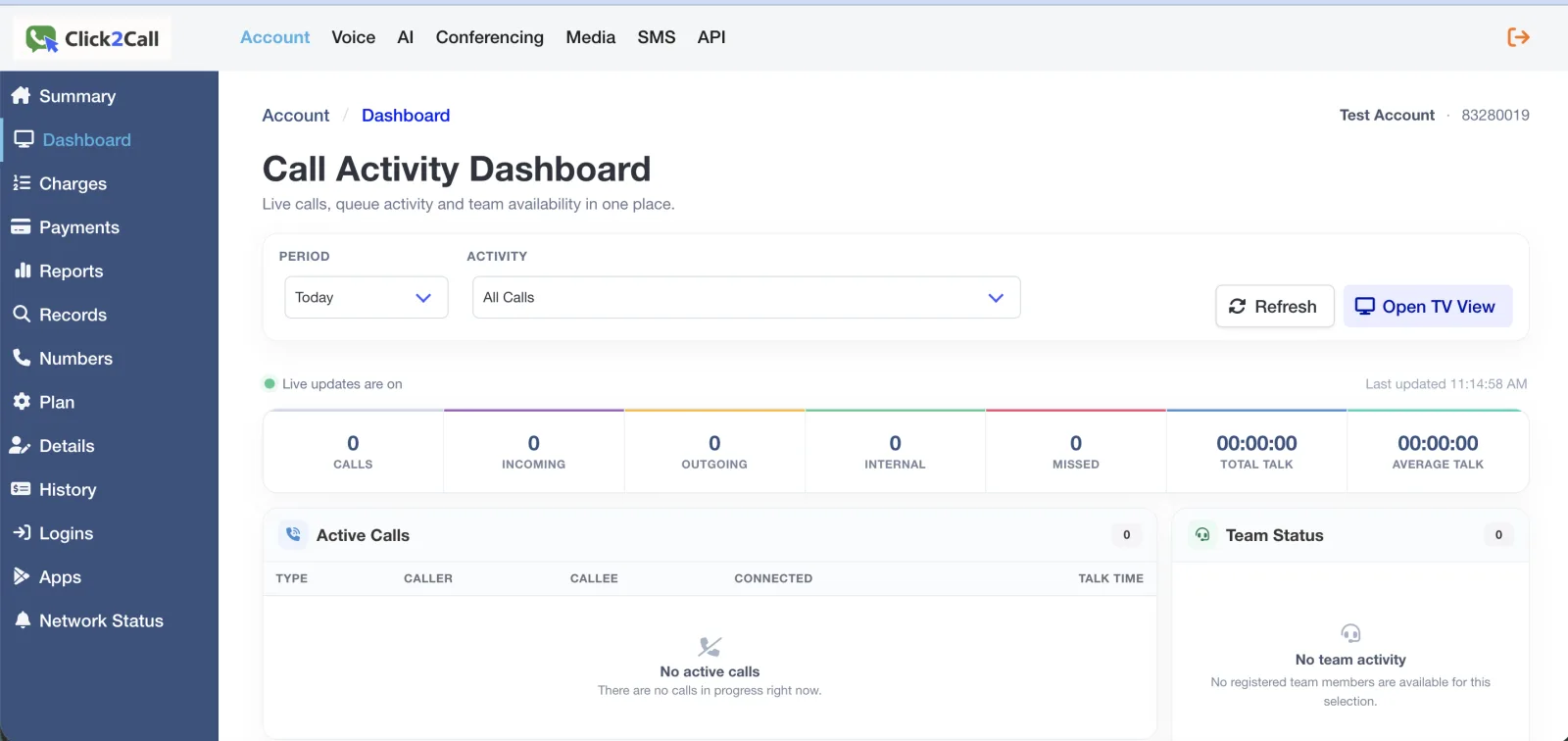
Live calls, queue activity and team availability in one place, updating continuously. It answers the question every manager asks at 11am: is the phone busy right now, and is anyone waiting?
Today's numbers, live
Counters across the top show total calls, incoming, outgoing, internal and missed, alongside total talk time and average talk time. Filter by period and by activity type. Missed calls are the number most businesses have never actually seen before, and it is usually the one that prompts a change.
Calls in progress and callers waiting
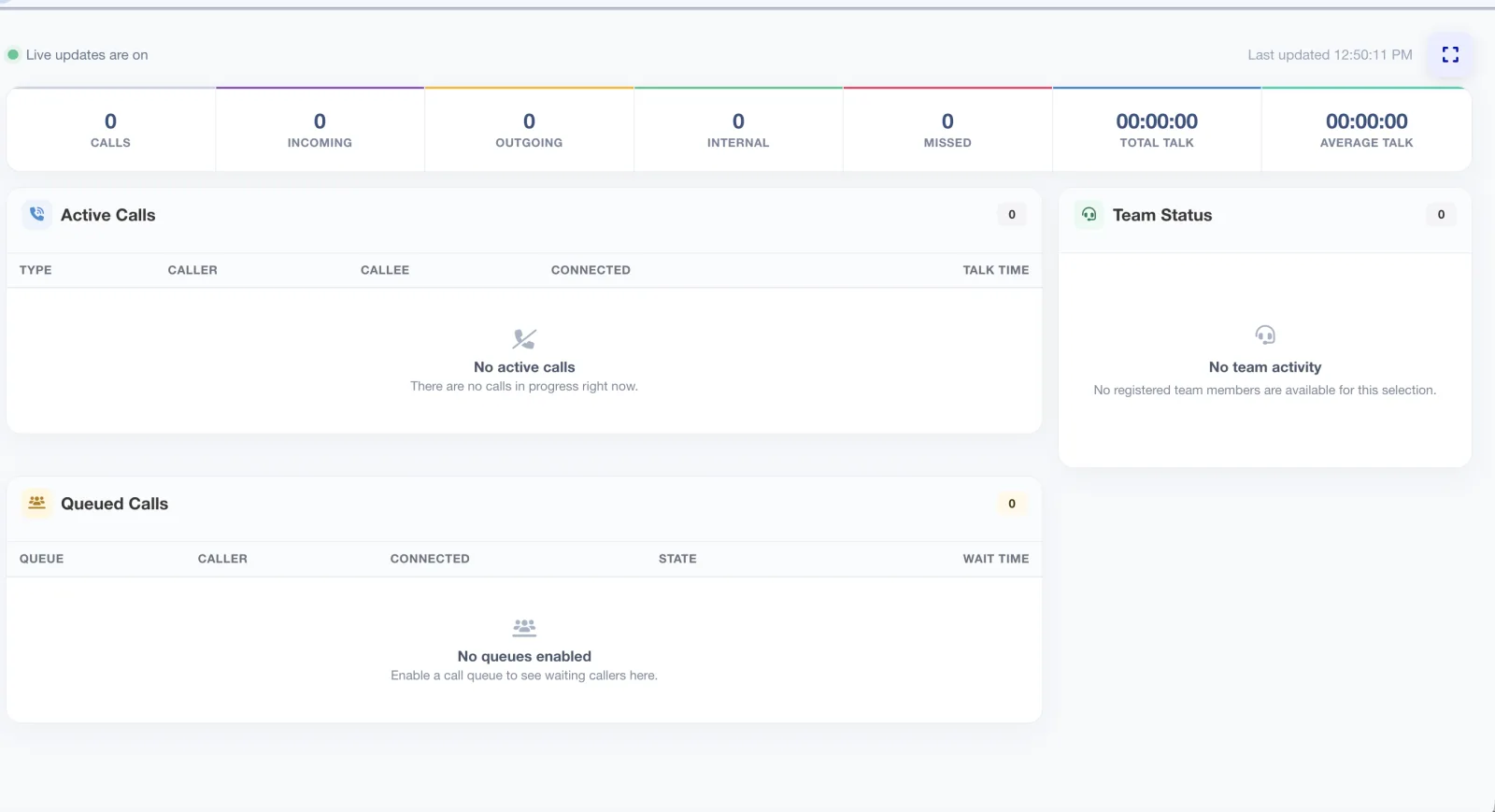
The active calls table lists each call underway — whether it is inbound, outbound or internal, who is on it, when it connected and how long it has been running. Below it, the queued calls table shows anyone waiting: which queue they are in, how long they have been holding and what state the call is in. A team status panel shows who is available.
Put it on the wall
A full-screen TV view turns the dashboard into a wallboard for a monitor on the office floor, so the team can see a queue building without anyone opening the portal. This is the piece most often sold as a separate supervisor or analytics licence elsewhere.
Call Routing
Queues sit on top of the routing rules that decide where a call goes in the first place.
Ring groups
Ring a whole department at once, or in sequence, before falling through to the next step. How to set one up →
Business hours
Different behaviour when you are open, closed, or on a public holiday you have added yourself. How to configure hours →
Auto-attendant menus
A traditional press-one menu where you want one, or the AI Receptionist where you would rather callers just say what they need.
Overflow and after hours
Send unanswered calls to another team, another site, a mobile, or voicemail with a transcript emailed through. How to build a call flow →
Recording, Transcription and Sentiment
The dashboard tells you what is happening now. This is what tells you what happened.
Every call is recorded automatically, transcribed by AI and summarised in a couple of plain-English sentences, then scored for sentiment — whether the caller sounded satisfied, neutral or frustrated. You read a summary instead of listening to a recording, which is the difference between reviewing calls occasionally and reviewing them properly.
Recordings, transcripts, summaries and sentiment data are stored on servers in Australia and New Zealand and are never sent offshore. The AI that writes the transcripts, summaries and sentiment scores runs in Australia too. Recording can be enabled or disabled per number. Call recording law differs between Australian states, so notify callers in line with the rules where you operate.
All of it is available through the API and webhooks, so call outcomes can be written into a CRM automatically. More detail on the analysis tools is on the AI voice tools page.
You Do Not Need to Be a Call Centre
Most businesses using these features would never describe themselves as one. If more calls sometimes arrive than you have people free to answer, you have the problem a queue solves.
Retail and multi-store businesses. Saturday morning, three customers ringing about deliveries and one person on the floor. A queue keeps them, the dashboard shows the manager it is happening.
Medical, dental and allied health. The phone rings while reception is with a patient at the desk. See our practice phone systems page.
Trades and service businesses. Everyone is on a job. Calls queue briefly, then overflow to whoever is closest to a phone rather than going to voicemail. See phone systems for tradies.
Property and professional services. Enquiries arrive in bursts after a listing goes live or a bill run goes out. The missed-call counter shows what those bursts actually cost.
What It Costs
Nothing beyond the standard plan.
| Item | Cost (ex GST) |
|---|---|
| Cloud PBX user — includes every feature on this page | $25 / user / month |
| Call queues | Included |
| Live call dashboard and TV wallboard view | Included |
| Call recording, transcription, summaries, sentiment | Included |
| AI Receptionist | Included |
| Per-agent queue surcharge | None |
| Additional inbound number | $10 / month |
Prepaid credit model. No lock-in contract, no minimum spend, no cancellation fee. Full detail on the pricing page.
Why This Is Usually an Upgrade
Queues, live dashboards and wallboards are rarely part of a standard business phone plan. Across the major platforms they sit behind either a paid add-on or a separate contact centre product, priced per agent on top of what you already pay for the phone system.
That is not a criticism of how they are packaged. It reflects who those products are built for: large teams that need omnichannel routing, workforce management and quality-monitoring tools, and are willing to pay for them. If that is your business, those platforms will serve you better than we will, and we would rather say so.
But most businesses do not need any of that. They need callers to wait in an orderly queue instead of hearing an engaged tone, and a screen showing who is waiting. Being asked to buy a contact centre licence for that is out of proportion to the problem.
So we include it. Call queues, the live dashboard, the TV wallboard, call routing, recording, transcription and sentiment analysis all come with a standard Cloud PBX user at $25 per user per month ex GST. No contact centre tier, no supervisor licence, no analytics add-on, no per-agent surcharge.
What we do not do
Worth being equally clear about the other side. Click2Call is not an omnichannel contact centre. There is no email, chat or social queueing, no workforce management or shift forecasting, no skills-based routing, and no automated quality scoring of agents. If you are running a contact centre where those things matter, buy a contact centre platform.
What we do is the phone part, properly, for businesses that answer calls without being a call centre.
Call Centre Feature Questions
Does Click2Call include call centre features, or are they a paid add-on?
They are included. Queues, the live dashboard, routing, recording, transcription and sentiment analysis all come with a standard Cloud PBX user at $25 per user per month ex GST. No separate tier, no add-on licence, no per-agent surcharge.
How many agents can I put in a call queue?
Agents are added to a numbered list and tried in the order you set, comfortably covering a full team or department. Each agent is a Cloud PBX user at $25/month ex GST, with no extra charge for queue membership. You can run multiple queues — one per department or per location — each with its own agents and behaviour.
What is a call queue wallboard?
A live view of call activity on a screen the team can see. Click2Call provides it through the TV view of the dashboard: current calls, callers waiting with their wait times, and the day's counters at a glance.
Do I need to be a call centre to use these features?
No, and most businesses using them are not. Any business where more calls sometimes arrive than there are people free to answer benefits from a queue.
Is call recording included, and where is the data stored?
Included on every call, with AI transcription, a written summary and a sentiment score. Stored on servers in Australia and New Zealand, never offshore. Configurable per number. Recording law differs by state, so notify callers accordingly.
Try it on your own calls
A 7-day free trial with $11 credit, no credit card required. Set up a queue and watch the dashboard on your own phone traffic.