
Connecting Twilio to Your Phone Number
If your call logic already lives in Twilio — a Studio Flow, an IVR, a Flex contact centre — but you want an Australian number with local porting and local support, the built-in Twilio Integration profile routes calls straight into your Twilio SIP Domain.
Last reviewed: September 2026
At a glance
- Mandatory Click2Call field
- Twilio Subdomain — the first label only
- Where Click2Call sends calls
- sip:<subdomain>.sip.twilio.com:5060;transport=tcp
- Twilio product
- SIP Domain (Programmable Voice) — not Elastic SIP Trunking
- Authentication
- IP Access Control List on the Twilio SIP Domain — add 103.212.52.19
- Number format
- +E.164, set automatically
- Code required
- No, if you use a Studio Flow or TwiML Bin
- Provider documentation
- Twilio: sending SIP into Twilio
Connecting Twilio, Step by Step
Create a SIP Domain in Twilio
In the Twilio Console open Voice → Manage → SIP Domains and create a domain. The name you choose becomes <subdomain>.sip.twilio.com.
SIP domain names are unique across every Twilio account, not just yours, so the obvious short names are long gone. Something like acme-voice-au will usually be free.
Point the domain at your call logic
Set the domain’s Voice Configuration Request URL. Twilio fetches it when a call arrives and executes whatever TwiML comes back.
If you would rather not write code, point it at a Studio Flow or a TwiML Bin — both produce valid TwiML without a server of your own.
Secure the domain with an IP Access Control List
Twilio will not accept SIP traffic to a domain that has neither an IP Access Control List nor a Credential List. Create an IP Access Control List and add the Click2Call signalling addresses.
Use an IP Access Control List, not a Credential List. Click2Call cannot present a username and password on an outbound INVITE, so a Credential List alone will reject every call. Add 103.212.52.19 to the Access Control List — that is the address our switch sends INVITEs from.
Create the profile in Click2Call
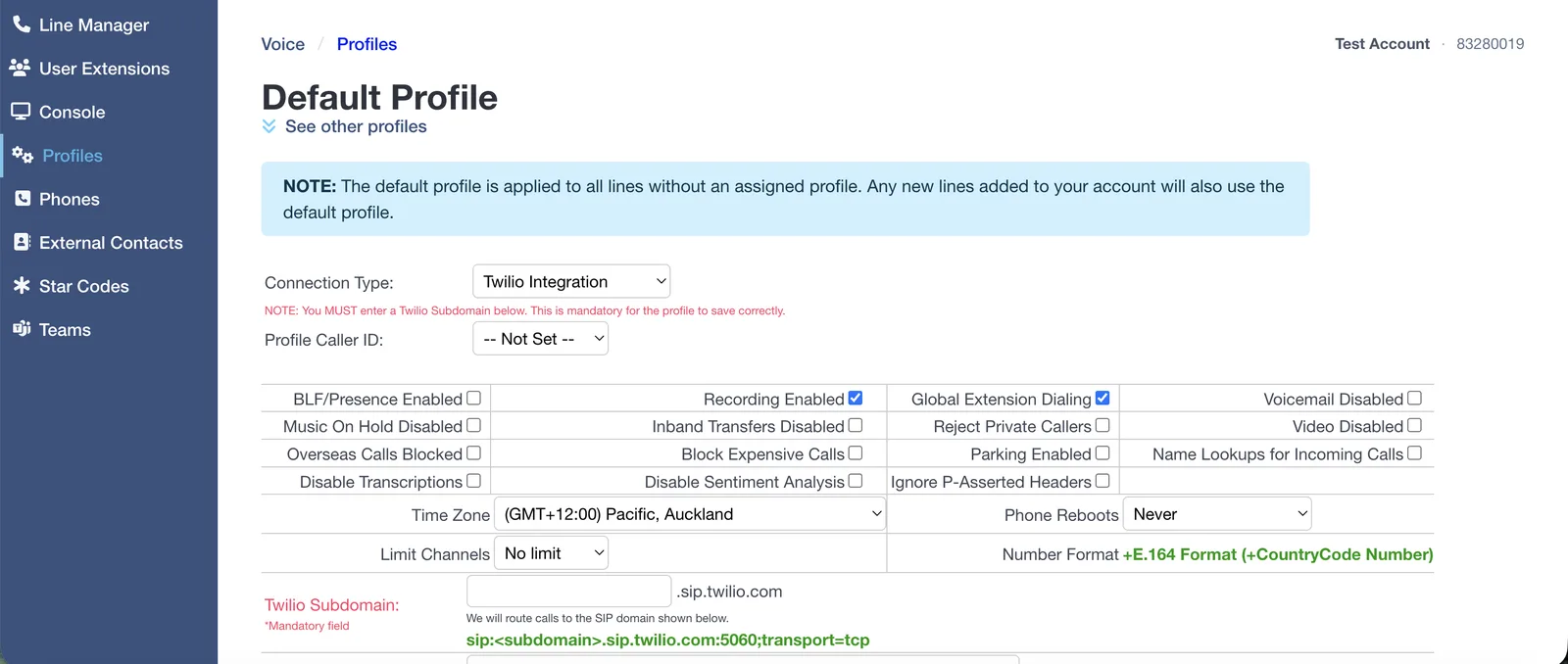
In the Click2Call portal open Voice → Profiles and set Connection Type to Twilio Integration.
Enter only the first label in the Twilio Subdomain field — if your Twilio domain is acme-voice.sip.twilio.com, type acme-voice. The field is mandatory. Click2Call appends the rest and shows the finished route under the field.
Assign your number, then check the time zone
Open Voice → Line Manager and set the Profile column for your number to the profile you just created.
The Default profile applies to every line with no profile assigned, and new numbers land on it automatically — a number left on Default will ignore everything you just configured. While you are in the profile, set the Time Zone to where the business operates: business hours, after-hours routing and queue schedules all read it.
Test the call
Ring the number from a mobile. Twilio should fetch your Voice Configuration URL and run the TwiML it returns. The Twilio Console call logs will show the request and any errors.
Troubleshooting
The provider replies 407 Proxy Authentication Required
The provider is challenging our INVITE for a username and password, which means our signalling address is not on their allowlist. Click2Call cannot answer that challenge on an outbound call, so the fix is always at the provider end — allowlist 103.212.52.19 rather than issuing credentials. While this is happening, callers hear “the number you have called is not available from this service”.
The profile will not save
The Twilio Subdomain field is empty. It is mandatory. Enter only the first label, not the full hostname and not a sip: prefix.
Twilio rejects the call with 403 Forbidden
The IP Access Control List on the SIP domain does not include the address Click2Call is signalling from, or the domain has no ACL and no Credential List at all. Twilio requires at least one.
Twilio accepts the call but nothing happens
The Voice Configuration Request URL is missing, unreachable, or returning something that is not valid TwiML. The Twilio Console call logs show the exact response Twilio received.
You configured Elastic SIP Trunking and it does not work
Elastic SIP Trunking termination uses a host ending in pstn.twilio.com, which is a different product. The Click2Call profile routes to sip.twilio.com, so you need a SIP Domain under Voice → Manage.
Calls go to Click2Call voicemail instead
The number is still on the Default profile rather than the provider profile, so the call never leaves for the provider at all. Check the Profile column in Line Manager.
Frequently Asked Questions
What goes in the Subdomain field?
Only the first label. For acme-voice.sip.twilio.com, enter acme-voice.
SIP Domain or Elastic SIP Trunking?
SIP Domain. Elastic SIP Trunking termination ends in pstn.twilio.com and is for sending calls out to the PSTN; a SIP Domain hands the call to your TwiML, Studio Flow or voice application, which is what you want here.
Do I need to write code?
Not necessarily — a Studio Flow or a TwiML Bin returns valid TwiML with no server of your own. You only need code if the call logic has to reach your systems.
Are calls still recorded and transcribed?
Yes, provided Recording Enabled is ticked on the profile. Recording, transcription, summaries and sentiment all work as normal on the Click2Call side, stored in Australia and New Zealand. See AI voice tools.
Can I use my existing business number?
Yes — port it across first, then assign it to the profile. Local and mobile numbers typically port in 5 to 10 business days.
Related Guides
Still need help?
Email our Australian support team with your account number and what you’re seeing. We support the Click2Call side of this connection; questions about the other product go to its vendor.