
Connecting ElevenLabs to Your Phone Number
Click2Call has a built-in Eleven Labs AI connection profile, so pointing an Australian number at an ElevenLabs agent takes one dropdown at our end and a number import at theirs. No code, no SIP settings to type.
Last reviewed: September 2026
At a glance
- Mandatory Click2Call field
- None — just pick the connection type
- Where Click2Call sends calls
- sip:sip.rtc.elevenlabs.io:5060;transport=tcp
- Authentication
- IP allowlist (ACL) on the ElevenLabs side — add 103.212.52.19
- Number format
- +E.164, set automatically
- Code required
- No — the agent is built in the ElevenLabs dashboard
- Provider documentation
- ElevenLabs SIP trunking
Connecting ElevenLabs, Step by Step
Build the agent in ElevenLabs
In the ElevenLabs Agents dashboard, create the agent that should answer the phone — its prompt, voice, knowledge and tools. Everything is configured in their dashboard; there is nothing to deploy.
Import your Click2Call number into ElevenLabs
Open Phone Numbers and choose Import a phone number from SIP trunk. Fill in:
- Label — anything that helps you find it later.
- Phone number — in E.164 format, e.g. +61355551234. It has to match exactly.
- Transport — TCP, to match what Click2Call sends.
- Authentication — choose ACL and allowlist the Click2Call signalling addresses.
Click2Call cannot present a username and password on an outbound INVITE, so the provider has to trust us by IP allowlist. Allowlist 103.212.52.19 — that is the address our switch sends INVITEs from. If a provider will only accept authenticated INVITEs, the connection has to run the other way round — the provider registers to Click2Call as the number, which is the generic method in connecting an AI voice agent.
Assign the agent to the number
Still in ElevenLabs, attach the agent to the number you just imported. Until an agent is assigned, calls reach ElevenLabs and go nowhere.
Create the profile in Click2Call
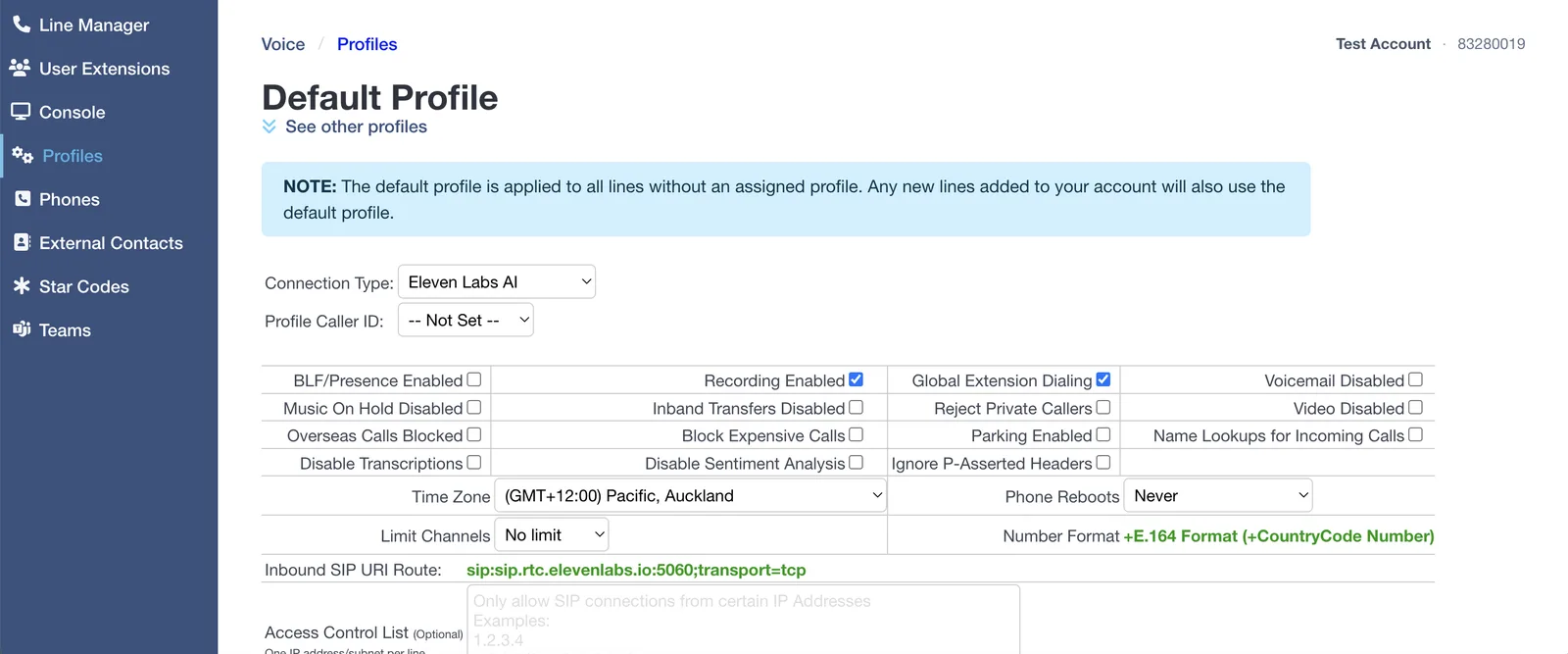
In the Click2Call portal open Voice → Profiles and set Connection Type to Eleven Labs AI.
There are no extra fields to fill in. Click2Call already knows the route — you can see it on the Inbound SIP URI Route line as sip:sip.rtc.elevenlabs.io:5060;transport=tcp — and the number format is set to +E.164 automatically.
Assign your number, then check the time zone
Open Voice → Line Manager and set the Profile column for your number to the profile you just created.
The Default profile applies to every line with no profile assigned, and new numbers land on it automatically — a number left on Default will ignore everything you just configured. While you are in the profile, set the Time Zone to where the business operates: business hours, after-hours routing and queue schedules all read it.
Test the call
Ring the number from a mobile. The agent should answer. If it does not, work through the checks below.
Troubleshooting
The provider replies 407 Proxy Authentication Required
The provider is challenging our INVITE for a username and password, which means our signalling address is not on their allowlist. Click2Call cannot answer that challenge on an outbound call, so the fix is always at the provider end — allowlist 103.212.52.19 rather than issuing credentials. While this is happening, callers hear “the number you have called is not available from this service”.
The call reaches ElevenLabs but no agent answers
Either the number was not imported in exactly the format Click2Call sends (+E.164, with the plus), or no agent is assigned to it. Check both in the ElevenLabs Phone Numbers screen.
Calls are rejected before ringing
The ACL on the ElevenLabs side does not include the address Click2Call is signalling from. Ask support for the current addresses.
Calls go to Click2Call voicemail instead
The number is still on the Default profile rather than your ElevenLabs profile, so it never leaves for ElevenLabs. Check the Profile column in Line Manager.
The agent answers but audio is one-way
Almost always a media path problem on the ElevenLabs side. Confirm the media encryption setting on the imported number matches what your trunk sends — Click2Call sends unencrypted media on TCP by default.
Frequently Asked Questions
Do I need to write code?
No. This is one of the no-code providers — the agent is built in the ElevenLabs dashboard, and Click2Call needs one dropdown. Compare that with OpenAI and xAI, which both need a webhook you host.
What number format does ElevenLabs expect?
E.164 — +61355551234, not 03 5555 1234. Click2Call sends +E.164 automatically, so import it that way.
Are calls still recorded and transcribed?
Yes, provided Recording Enabled is ticked on the profile. Recording, transcription, summaries and sentiment all work as normal, stored in Australia and New Zealand. See AI voice tools.
Can I use my existing business number?
Yes — port it across first, then assign it to the profile.
Related Guides
Still need help?
Email our Australian support team with your account number and what you’re seeing. We support the Click2Call side of this connection; questions about the other product go to its vendor.